Feeds and Speeds for CNC Routing: The Practical Guide for Furniture Makers
Chip load, RPM and feed rates for CNC routing chipboard, MDF and solid wood - the numbers that decide whether your tooling survives.
Key Takeaways
- Wrong parameters rarely snap a bit — but they can halve its lifespan overnight. Getting feeds and speeds right is the single biggest factor in tool cost per metre.
- Chip load is the number that matters most. RPM and feed rate are just the inputs; chip load is the outcome your cutting edge actually feels.
- Match the tool to the job, then match the parameters to the tool. A DTM Z3+3 running at 15 m/min is wasted money — it needs 20+ to justify its geometry. A DTE Z3+1 at the same speed is in its sweet spot.
- Material matters more than you think. Laminated chipboard, MDF and solid wood each demand different approaches, even with the same diameter bit.
- Dust extraction is not optional. Without proper suction, even perfect feeds and speeds won't save your edge quality or tool life.
Why Getting Feeds and Speeds Right Matters
There's a persistent myth in CNC workshops that if your router bit isn't snapping, your parameters must be fine. The reality is far more expensive. As one ITA Tools technician puts it: "Every tool has its expected parameters. If you don't apply them, it won't cause the bit to break — it may simply have significantly shorter life." That shorter life adds up. A 12 mm nesting bit that should last four full shifts might barely survive two when consistently run outside its optimal window. Over a year, across dozens of bits, that's thousands of pounds in unnecessary tooling costs.
The frustrating part is that both extremes cause damage. Running too fast generates excessive heat and micro-chipping along the cutting edge. Running too slow creates rubbing instead of cutting — the edge glazes over the material surface, friction builds up, and you end up with burning marks on your boards and premature dulling on your flutes. Neither failure mode is dramatic enough to stop production immediately, which is precisely why so many shops run with suboptimal parameters for months without realising it.
This guide lays out the practical feed and speed data gathered directly from ITA Tools technicians who test these bits in production environments — not theoretical calculations from a textbook, but real numbers from real machines cutting real boards.
The Fundamentals: RPM, Feed Rate and Chip Load
Spindle Speed (RPM)
Spindle speed is how fast your router bit rotates, measured in revolutions per minute. For most CNC nesting operations in furniture production, you'll be working between 18,000 and 24,000 RPM. The diameter of your bit is the primary factor here — larger diameters need lower RPM to keep peripheral speed within safe limits. For the most common 12 mm shank bits used in board processing, 20,000–21,000 RPM is the standard starting point. Going higher than the recommended range doesn't make you cut faster; it makes you generate more heat per unit of material removed, which accelerates wear.
Feed Rate (m/min)
Feed rate is the speed at which the machine moves the bit through the material, measured in metres per minute. This is the number most operators adjust first — and the one most often set incorrectly. Feed rate must be proportional to your RPM and the number of flutes on your bit. A three-flute bit at 20,000 RPM needs a fundamentally different feed rate than a single-flute bit at the same speed, because each revolution presents three cutting edges to the material instead of one.
Chip Load — The Number That Matters
Chip load is the thickness of material each individual cutting edge removes per revolution. It's the parameter that actually determines whether your bit is cutting efficiently, rubbing destructively, or being overloaded. You rarely set chip load directly on the machine — instead, you arrive at it through your combination of RPM, feed rate and flute count.
Chip Load = Feed Rate ÷ (RPM × Number of Flutes)
Or rearranged: Feed Rate = RPM × Number of Flutes × Chip Load per Tooth
For most CNC router bits processing wood-based boards, typical chip load values fall between 0.10 mm and 0.30 mm per tooth, depending on diameter, material and flute count. Too thin and the edge rubs instead of cutting — you're generating heat without removing material. Too thick and the forces on each flute exceed what the geometry can handle cleanly, causing micro-chipping. The sweet spot depends on the specific tool geometry, the material, and your machine's rigidity — but getting within the right ballpark is what separates a bit that lasts four shifts from one that lasts one. Note: for up/down spiral bits (DTE, DTF, DTM), the effective flute count used in the formula depends on the cutting section — some engineers count only the upcut flutes, others count the total.
Recommended Parameters by ITA Tools Series
The following table summarises the tested operating parameters for each major ITA Tools CNC router bit series. These figures come directly from technician testing in production environments, not from theoretical calculations.
| Series | Configuration | Best Material | Feed Rate (m/min) | RPM (12 mm) | Notes |
|---|---|---|---|---|---|
| DTE | Z3+1 (3 up, 1 down) | Laminated chipboard | 15–20 (tested to 22) | 20,000–21,000 | Bestseller for nesting. Ideal balance of speed and finish. |
| DTF | Z2+2 (2 up, 2 down) | MDF, laminated chipboard | 12–18 | 20,000–21,000 | Fewer flutes = better chip evacuation. Outperforms DTM at lower feeds. |
| DTM | Z3+3 (3 up, 3 down) | Laminated chipboard | 20–30 (tested to 40) | 20,000–21,000 | Maximum throughput. Requires HSK63F toolholder. Overkill below 20 m/min. |
| X99 | Compression | Laminated chipboard | 20 | 20,000 | Premium carbide with Platinium® coating. "4 shifts without stopping." ~£100 per bit. |
| DTS | Z2 axial | HPL, Corian, plywood | 10–15 | 20,000–21,000 | Universal bit. Clean edges on difficult laminates and solid surfaces. |
| DTA | Z1+1 (1 up, 1 down) | General purpose | Up to 5 | 18,000–20,000 | Entry-level. Good for low-volume or prototype work. |
A critical point that the table alone doesn't convey: choosing the right series is as important as setting the right parameters. The DTM 12 mm is a phenomenal bit — but only if your machine and workflow can sustain 20+ m/min feed rates. As the ITA technician explains: "DTM to be worthwhile should run at 20+ m/min. At 15 m/min you're not using its potential." At that lower speed, the DTE 12 mm or the DTF 12 mm will give you identical or better results at a lower bit cost. Don't buy the fastest tool — buy the tool that matches your actual production speed.
Material-Specific Parameters
Laminated Chipboard (Egger, Kronospan) — The Bread and Butter
Laminated chipboard is what 80% of UK furniture CNC shops spend most of their time cutting. The melamine surface is the challenge — it's harder than the chipboard core beneath it, and it chips if the cutting edge isn't sharp or the parameters aren't balanced. For standard 18 mm laminated board, a DTE Z3+1 at 20,000 RPM and 18 m/min is the industry workhorse setup. The three upcut flutes handle chip evacuation efficiently whilst the single downcut scores the top laminate cleanly.
If you're running a high-throughput nesting line and your machine can handle it, stepping up to a DTM Z3+3 at 25 m/min delivers noticeably higher output. But the prerequisite is genuine: your machine must be rigid enough, your toolholder must be HSK63F shrink-fit, and your vacuum hold-down must keep the board absolutely stable at those speeds. Any flex in the system negates the advantage.
For shops looking at the diamond option, the X99 compression bit at 20 m/min and 20,000 RPM runs through laminated chipboard with remarkable longevity — technicians report four full shifts of continuous cutting without edge degradation. At roughly £100 per bit, the cost per metre cut is often lower than carbide despite the higher upfront price. For a deeper look at making that switch, see our diamond vs carbide comparison guide (coming soon).
MDF — Slower, More Dust, More Patience
MDF is deceptively tricky. It cuts easily — too easily, in fact. The uniform density means there's no grain structure to provide natural chip breaking, so the material turns into extremely fine dust rather than clean chips. This dust clogs flutes rapidly and generates heat through friction if extraction isn't exceptional. Drop your feed rate by 15–20% compared to chipboard settings. The DTF Z2+2 is the preferred choice here: the two-flute configuration provides significantly more gullet space between cutting edges, giving the dust somewhere to go before being evacuated. At 14–16 m/min and 20,000 RPM, you'll get clean edges and respectable tool life. Pushing beyond 18 m/min in MDF typically doesn't increase throughput meaningfully because the dust becomes the bottleneck, not the cutting speed. For more on choosing the right bit for MDF work, our nesting bits complete guide covers the topic in depth.
Plywood — Respect the Layers
Plywood presents alternating grain directions in every layer, which means any bit that works purely in one direction will tear at least some of those layers. Compression bits (coming soon) are the standard answer for quality plywood work — the upcut geometry cleans the bottom face whilst the downcut geometry holds the top face. The X90 compression handles birch ply and hardwood plywood effectively at 15–18 m/min. For softwood ply (spruce, pine), you can push slightly faster, but watch for tear-out on the outer veneers. Reduce feed rate by 10% for veneered or pre-finished plywood where surface quality is critical.
Solid Wood — Along vs Across the Grain
Solid wood is a different discipline entirely, and the technician's advice here is unambiguous: "With solid wood you need to watch whether you're cutting along the grain or across — completely different parameters than board." Cutting along the grain (rip cutting) allows higher feed rates because the wood fibres separate relatively cleanly. Cutting across the grain (cross-cutting) requires a slower approach because the fibres must be severed rather than split, and aggressive feeds will tear the surface. A good starting point for solid hardwood (oak, ash, beech) is 8–12 m/min along the grain and 5–8 m/min across it, using a DTS Z2 at 18,000–20,000 RPM. Softwoods like pine or spruce can handle 20–30% faster feeds, but resin buildup becomes a factor — clean your bits regularly.
Toolholders: HSK63F vs ER Collet
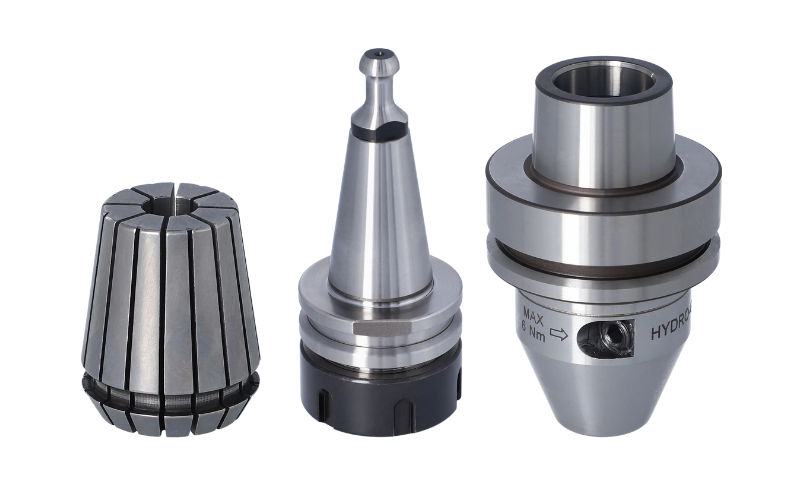
Your toolholder is part of the cutting system, not just a way to grip the bit. At moderate feed rates — up to about 18 m/min — a quality ER32 or ER40 collet chuck provides adequate concentricity and clamping force. The bit runs true enough, the collet absorbs minor vibrations, and tool life is predictable. Most shops running DTE or DTF series bits at their standard parameters are perfectly well served by ER collets.
The equation changes when you move to DTM Z3+3 territory at 20+ m/min. At these speeds, even slight runout from the collet translates into uneven loading across the six flutes, which causes premature wear on the flutes taking the heaviest cut. HSK63F shrink-fit toolholders grip the shank with near-zero runout and far greater rigidity. They're more expensive and require a heat-shrink unit to change bits, but for high-speed nesting operations they're not optional — they're a prerequisite. Running a DTM at 25 m/min in an ER collet is technically possible, but you'll see 20–30% shorter tool life compared to the same bit in an HSK63F holder. Over a year of production, the toolholder pays for itself many times over in saved bits.
Dust Extraction — Check the Suction Before You Change the Bit
Here's a scenario that plays out regularly in CNC workshops: edge quality deteriorates, the operator blames the bit, swaps in a new one, and the problem returns within a day. The actual cause is often a blocked extraction hose, a worn-out brush skirt, or an undersized dust collector struggling to keep up with the chip volume. ITA technicians consistently emphasise this point — without good extraction, even the best bit won't perform.
Proper dust extraction does three critical things. First, it removes chips from the cutting zone so the bit isn't re-cutting material it has already processed. Re-cutting generates enormous heat with no productive output. Second, it prevents chip packing in the flutes, which reduces the effective cutting depth and forces the remaining exposed edge to do all the work. Third, it pulls heat away from the cutting edge — the airflow through a well-ducted extraction system provides genuine cooling.
Before troubleshooting any feed and speed issue, verify your extraction. Measure the airflow at the tool with a simple tissue test — if a tissue held near the extraction port doesn't get pulled in firmly, your suction is insufficient. Check hoses for kinks or buildup, verify that your main collector filter has been cleaned or replaced on schedule, and ensure the extraction hood or brush skirt creates a proper seal around the cutting area. A £3,000 dust collector serving a £80,000 CNC is a false economy — size your extraction to your machine's capability, not to your budget's preference.
Three Mistakes That Kill Your Router Bits
1. Running Too Fast — Speed Isn't Free
Pushing feed rate beyond what the bit geometry can handle seems productive in the short term. You process more sheets per shift, the machine sounds busy, and the parts come out... acceptable. But the cutting edges are experiencing micro-chipping — tiny fragments of carbide breaking away under loads the geometry wasn't designed for. Each micro-chip creates a slightly duller spot that generates more heat, which causes more chipping, in an accelerating cycle. A bit that should last 800 linear metres might give you 400. The extra sheets you processed in shift one cost you a bit change and lost time in shift three.
2. Running Too Slow — Rubbing Is Worse Than Cutting
The opposite mistake is surprisingly more common and harder to detect. At very low feed rates relative to RPM, each flute removes such a thin chip that the cutting edge essentially rubs against the material rather than shearing it cleanly. Rubbing generates friction heat without productive material removal. The board surface burns or glazes, the edge dulls through abrasion rather than sharp wear, and the finish quality deteriorates in a way that's hard to distinguish from a simple dull bit. Many operators who change bits "every 200 metres because they dull quickly" are actually running too slow and wearing the edge through friction rather than cutting.
3. Ignoring Chip Load — The Hidden Parameter
You can have the correct RPM and a reasonable feed rate and still be outside the optimal window if the combination doesn't produce the right chip load for your material. Adding flutes without proportionally increasing feed rate reduces chip load per tooth. Changing RPM without adjusting feed rate shifts chip load in the other direction. Every time you change any variable in the cutting equation, recalculate chip load and verify it falls within the target range for your material. For laminated chipboard, aim for 0.15–0.25 mm per tooth. For MDF, 0.10–0.20 mm. For solid hardwood, 0.15–0.30 mm.
Frequently Asked Questions
What feed rate should I start with if I'm unsure?
Begin at the lower end of the recommended range for your specific bit series and material. For a DTE Z3+1 in laminated chipboard, that means 15 m/min at 20,000 RPM. Run a few test cuts, inspect the edge quality and chip formation, then increase by 1–2 m/min increments until you reach the sweet spot. You'll know you're there when the chips are uniform, the edge is clean on both faces, and there's no discolouration on the board or the bit.
Can I use the same parameters for 18 mm and 25 mm chipboard?
Generally yes, though thicker boards benefit from a slight reduction in feed rate — roughly 5–10%. The increased cutting depth means each flute is engaged with more material per pass, which increases cutting forces. The same bit at the same RPM may need to drop from 18 m/min to 16 m/min when moving from 18 mm to 25 mm board. Adjust and test rather than assuming identical performance.
Why does my bit last longer in some boards than others?
Melamine quality varies significantly between manufacturers and even between production batches. Some laminate surfaces contain more abrasive mineral fillers than others. Recycled chipboard cores can contain contaminants — staples, nails, grit — that cause localised edge damage. If you notice inconsistent tool life, track which board batches correlate with shorter bit lifespan. Premium boards from Egger and Kronospan tend to be more consistent than budget alternatives.
Is a compression bit always better than an up/down spiral?
Not always. Compression bits (coming soon) excel at providing clean edges on both faces simultaneously, which is essential for double-laminated boards. However, for single-faced material or situations where only one face matters (e.g., the visible face in carcass construction), a standard up/down spiral like the DTE can be more cost-effective and easier to set up. Compression bits also require precise depth setting — the transition point between upcut and downcut geometry must align correctly with your board thickness.
How do I know when a bit needs replacing?
The first sign is almost always edge quality, not breakage. Watch for increased chipping on the melamine surface, fuzzy or fibrous edges on MDF, or burning marks on solid wood. Listen for changes in cutting sound — a dull bit produces a higher-pitched, more strained noise. Some operators track linear metres cut per bit and establish replacement schedules based on historical data. For laminated chipboard, a quality carbide bit like the DTE 12 mm typically delivers 600–1,000 linear metres before quality deteriorates noticeably.
Do I need different parameters for pod-and-rail vs flatbed CNC machines?
The fundamental feed and speed calculations remain the same regardless of machine type. However, pod-and-rail machines often have less inherent rigidity than flatbed gantry machines, particularly when cutting narrow parts that are held by only two pods. In these situations, reduce feed rate by 10–15% to compensate for potential part movement. Flatbed machines with vacuum hold-down provide more consistent clamping, allowing you to run closer to the upper end of recommended parameters.
Ready to Optimise Your CNC Parameters?
Browse our full range of ITA Tools CNC router bits — each with recommended feeds and speeds.
Browse CNC Router Bits X90 Series X99 Series